PlaylistTime / Guides / Finish a playlist
How to Finish a YouTube Playlist on Time: Calculate, Plan and Track Your Progress
To finish a YouTube playlist on time, find its total length, divide it by your playback speed, then divide by the minutes you can watch each day. That gives the number of days, and the days give you a finish date. The hard part is the first number, because YouTube shows how many videos a playlist has but not how long it runs. You can use our playlist length calculator for that: paste the link and it adds up every video for you.
This guide walks through the whole plan with real course playlists we measured on October 26, 2026: how long it takes to watch a YouTube playlist, how many minutes a day you need, what 1.5x or 2x does to the finish date, how to track progress and resume, and what to do when you fall behind.
How long does it take to watch a YouTube playlist?
It takes the total length of its videos divided by your playback speed. A playlist with 10 hours of video takes 10 hours at 1x, 8 hours at 1.25x, 6 hours 40 minutes at 1.5x and 5 hours at 2x. Ads and pauses come on top.
Formula: watch time = total length / speed. Days = watch time / minutes a day, rounded up.
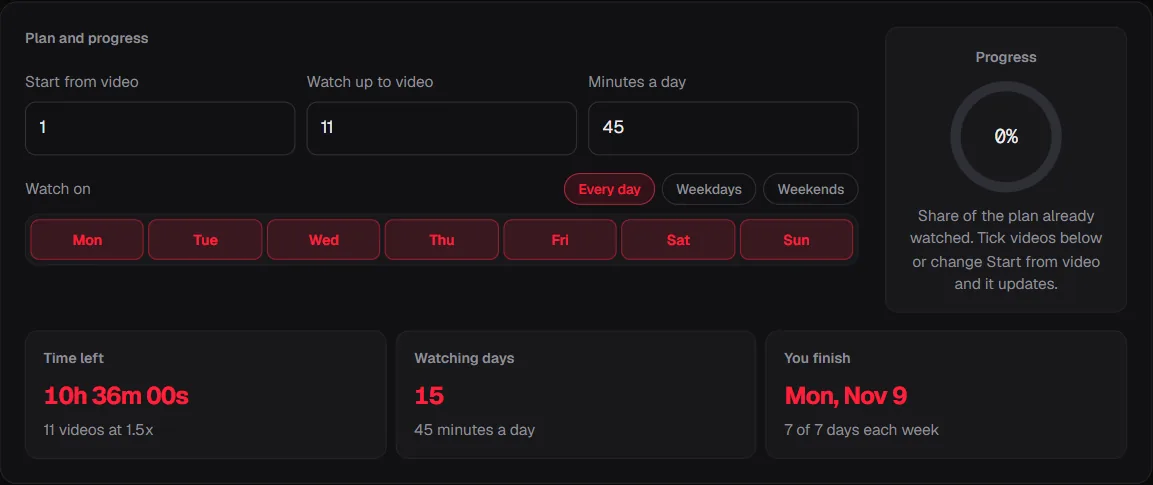
Worked example: Harvard's CS50's Introduction to Programming with Python (CS50P) 2022 playlist had 11 videos and 15h 54m of video when we measured it on October 26, 2026. At 1.25x: 15h 54m / 1.25 = 12h 43m, so you save 3h 11m. At 1.5x it is 10h 36m, and at 2x 7h 57m. At 45 minutes a day and 1.5x you finish in 15 days.
Total length of CS50's Introduction to Programming with Python (CS50P) 2022 (11 videos), measured through the PlaylistTime API on October 26, 2026, divided by each speed.
Show these numbers as a table
| Speed | Watch time | Time saved |
|---|---|---|
| 1x | 15h 54m | - |
| 1.25x | 12h 43m | 3h 11m (20%) |
| 1.5x | 10h 36m | 5h 18m (33%) |
| 1.75x | 9h 05m | 6h 49m (43%) |
| 2x | 7h 57m | 7h 57m (50%) |
To get these numbers for your own playlist, copy its link and paste the link into the playlist length calculator. It reads every video from YouTube's official data, so the total is exact to the second.
How the playlist length calculator works
It reads every video's length from YouTube, adds them up, then divides by your speed and your minutes a day. Step by step, this is what happens when you paste a link into our playlist duration calculator:
- It reads the playlist ID from the link: the part after
list=. Links to a video playing inside a playlist work too. - It asks YouTube for the list of videos through the official YouTube Data API, 50 at a time, up to the 5,000 a playlist can hold.
- It asks for each video's duration. YouTube returns it in a format like
PT1H27M3S(1 hour 27 minutes 3 seconds), which is turned into seconds. - It adds up the playable videos. Private, deleted and blocked videos have no duration, and live streams have no final one, so they are listed but not counted.
- It divides by the speed for each of 1x, 1.25x, 1.5x, 1.75x and 2x at once, or any speed you type from 0.25x to 4x.
- It divides by your minutes a day, rounds up to whole days and counts forward only on the days of the week you picked, which gives the finish date.
Formulas: total = sum of video durations. Watch time = total / speed. Days = watch time / (minutes a day x 60), rounded up. Finish date = the nth watching day from today.
Worked example: for MIT 18.06 Linear Algebra, Spring 2005 (36 videos, 28h 00m), 1.5x gives 28h 00m / 1.5 = 18h 40m. At 30 minutes a day: 18h 40m / 30 minutes = 38 days, so starting on October 26, 2026 you finish on Dec 2, 2026. The curve below shows how the days fall as you add minutes, for three speeds.
Watching days for 28h 00m of video at 1x, 1.5x and 2x, every day. The dot is 30 minutes a day at 1.5x, starting October 26, 2026.
Show these numbers as a table
| Minutes a day | 1x | 1.5x | 2x |
|---|---|---|---|
| 15 | 112 days | 75 days | 56 days |
| 20 | 84 days | 56 days | 42 days |
| 30 | 56 days | 38 days | 28 days |
| 45 | 38 days | 25 days | 19 days |
| 60 | 28 days | 19 days | 14 days |
| 75 | 23 days | 15 days | 12 days |
| 90 | 19 days | 13 days | 10 days |
| 105 | 16 days | 11 days | 8 days |
| 120 | 14 days | 10 days | 7 days |
How to finish a YouTube playlist on time, step by step
Five steps: get the total, pick a speed, pick your minutes a day, pick your days of the week, and track what is left.
1. Get the total length
Copy the playlist link (on a phone: Share, then Copy link) and paste it into the calculator. You get the total, the number of videos it counted, and the longest and shortest video.
2. Pick a playback speed you can follow
Every speed shortens the total by the same rule: 1.25x saves 20%, 1.5x saves 33% and 2x saves 50%. Studies on lecture videos found little loss of understanding up to about 1.5x and more loss above 2x; our guide on watching YouTube at 2x speed sums up what they found.
3. Choose your minutes a day
Pick a number you can keep on a normal day, not on your best day. Thirty minutes kept every day adds up to three and a half hours a week, and a daily habit is easier to keep than a long weekend session.
4. Choose the days you will watch
If you only study on weekdays, count only weekdays. The calculator's planner lets you switch days of the week on and off and moves the finish date to match.
5. Track what is left
Tell the calculator which video you are on, or tick the videos you have watched. It shows the time left, your progress in percent and the new finish date. Ticks stay in your own browser.
How long does it take to finish a YouTube course?
Most of the course playlists we measured take between 7 and 30 hours at normal speed, which is about 2 to 9 weeks at 30 minutes a day. The median of the 37 playlists in our YouTube course length study was 10h 53m. University lecture series run longer: MIT's MIT 18.06 Linear Algebra, Spring 2005 had 36 lectures and 28h 00m of video.
Worked example: 28h 00m at 1x and 30 minutes a day is 56 days. Watch at 1.5x and it drops to 38 days; at 2x, 28 days. Starting on October 26, 2026 and watching every day, that is a finish on Dec 20, 2026, Dec 2, 2026 or Nov 22, 2026.
Days and finish date at 30 and 60 minutes a day, every day, starting on October 26, 2026.
Show these numbers as a table
| Speed | 30 min a day | 60 min a day |
|---|---|---|
| 1x | 56 days · Dec 20 | 28 days · Nov 22 |
| 1.25x | 45 days · Dec 9 | 23 days · Nov 17 |
| 1.5x | 38 days · Dec 2 | 19 days · Nov 13 |
| 1.75x | 32 days · Nov 26 | 16 days · Nov 10 |
| 2x | 28 days · Nov 22 | 14 days · Nov 8 |
Where does your playlist sit? The chart below groups the 37 course playlists we measured by length. CS50P, at 15h 54m, falls in the 15 to 20 hour band with a few other full online courses; at 30 minutes a day that band means about a month at normal speed.
Number of course playlists in each length band, measured through the PlaylistTime API on October 26, 2026. The marked band is the example in the text.
Show these numbers as a table
| Length (hours) | Playlists |
|---|---|
| 0-5 | 6 |
| 5-10 | 10 |
| 10-15 | 6 |
| 15-20 | 3 |
| 20-30 | 7 |
| 30-50 | 3 |
| 50-100 | 2 |
How long is a 100 video playlist?
It depends on the videos, but at the median video length in our data (20m), 100 videos is about 32h 57m. The average video length in the course playlists we measured ran from 4m to 2h 02m, so 100 videos could be anything from about 6h 10m to about 202h 52m.
That is why the video count tells you so little. Khan Academy's Algebra 1 | Khan Academy playlist has 302 videos but only 25h 20m of video, because each one averages 5m. Harvard's CS50P has 11 videos and 15h 54m, because each lecture averages 1h 27m. Count the time, not the videos.
Once you have the hours, this table tells you what kind of commitment the playlist is:
| Length | What it usually is | Days at 30 min a day (1x / 1.5x) | Examples we measured |
|---|---|---|---|
| Under 4 hours | A short explainer series. About a week or less at 30 minutes a day. | up to 8 / 6 | Essence of linear algebra (3Blue1Brown) (3h 01m); Essence of calculus (3Blue1Brown) (3h 11m) |
| 4 to 10 hours | A tutorial series or a short course. One to three weeks at 30 minutes a day. | up to 20 / 14 | Folgen und Reihen (Mathe by Daniel Jung) (4h 30m); AP Calculus AB limits (Khan Academy) (4h 58m) |
| 10 to 20 hours | A full online course. Three to six weeks at 30 minutes a day, less at 1.5x. | up to 40 / 27 | Python 3, Mundo 1 (Curso em Video) (10h 37m); Linear algebra (Yobinori) (10h 42m) |
| 20 to 40 hours | A semester of university lectures. Six to eleven weeks at 30 minutes a day, or three to six weeks at an hour a day. | up to 80 / 54 | SAT Math (Organic Chemistry Tutor) (21h 43m); Algebra 1 (Khan Academy) (25h 20m) |
| Over 40 hours | A whole subject or a long series. Plan an hour a day, or spread it over several months. | up to 200 / 134 | Super Easy German (43h 12m); Calculus 1 (Professor Leonard) (44h 57m) |
Days are for the top of each band at 30 minutes a day, every day. Examples are course playlists we measured on October 26, 2026.
How many hours a day to finish a playlist in a week?
Divide the playlist's watch time by 7. A 10-hour playlist needs about 1 hour 26 minutes a day at 1x to finish in a week, or about 43 minutes a day at 2x.
Worked example: MIT's 6.0001 Introduction to Computer Science and Programming in Python. Fall 2016 playlist had 38 videos and 9h 58m. To finish in 7 days you would need 1h 25m a day at 1x, 57m a day at 1.5x or 43m a day at 2x. Only weekdays? Divide by 5 instead of 7.
For a fixed deadline, the study planner does this the other way round: you give it the date and the days you study, and it tells you the minutes a day and which videos to watch on which day.
How many minutes a day do you need to finish a course?
Total watch time divided by the number of days you have. Or, the other way round, here is how many days the MIT 18.06 Linear Algebra, Spring 2005 playlist (28h 00m) takes at each daily amount and speed:
| Minutes a day | 1x | 1.25x | 1.5x | 1.75x | 2x |
|---|---|---|---|---|---|
| 15 | 112 | 90 | 75 | 64 | 56 |
| 20 | 84 | 68 | 56 | 48 | 42 |
| 30 | 56 | 45 | 38 | 32 | 28 |
| 45 | 38 | 30 | 25 | 22 | 19 |
| 60 | 28 | 23 | 19 | 16 | 14 |
| 90 | 19 | 15 | 13 | 11 | 10 |
| 120 | 14 | 12 | 10 | 8 | 7 |
Each cell is the number of watching days for 28h 00m of video. Darker cells take longer. The outlined cell is 30 minutes a day at 1.5x.
Leave room for the work around the videos. A lecture with exercises takes longer than its running time, so many people plan the video time and then add the same again for practice.
Does watching at 1.5x or 2x help you finish faster?
Yes: at 1.5x you need two thirds of the time, and at 2x half. On a 30-minute-a-day plan that moves the finish date by weeks on a long course.
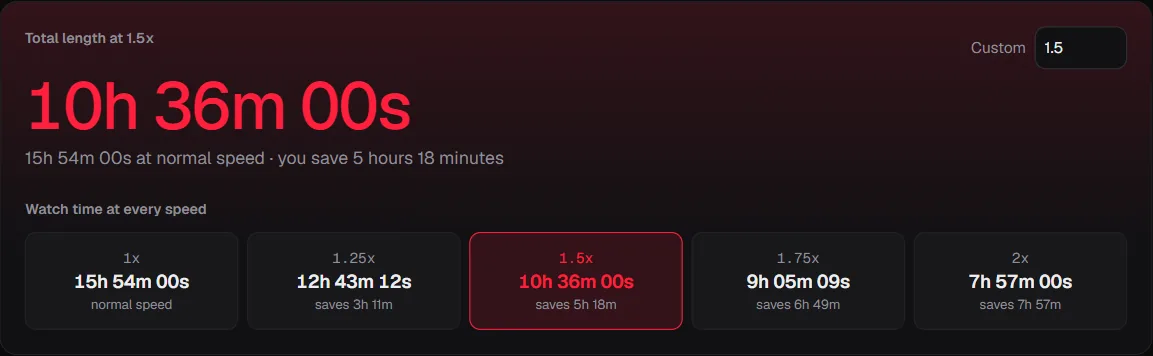
The time saved grows with the length of the playlist. On CS50P, 2x saves 7h 57m; on the MIT 18.06 Linear Algebra, Spring 2005 playlist it saves 14h 00m. Whether you still learn as much at that speed is a separate question; the research is summed up in our 2x speed guide. For a single video, the watch time calculator shows the time at every speed.
How to track progress on a YouTube playlist
YouTube marks each video you have watched with a red bar, but it does not add up what is left. To track progress across the whole playlist:
- Open the playlist in the calculator.
- Enter the number of the video you are on in "Start from video", or tick each video you have finished in the list.
- Read the time left, the percent done and the finish date. They update as soon as you change anything.
- Bookmark the page or copy the share link: the address keeps your speed, range, minutes a day and days, so the plan opens the same way next time.
Working through several playlists at once, like a course split into parts? The multiple playlist calculator combines up to 10 into one total and one finish date. For a whole channel, use the channel length calculator.
A paper or spreadsheet tracker works too. The calculator's Excel export gives you every video with its length and a running total, ready to tick off.
How to resume a YouTube playlist where you left off
When you are signed in, YouTube remembers where you stopped in each video and starts from there when you play it again. YouTube's help page says it only does this when you are signed in, that it may not do it when a video is mostly complete, and that clearing your watch history clears the progress bars.
To continue a playlist, open the playlist and pick the first video without a full red bar. To know how much is left from there, put that video's number into the calculator's "Start from video" box.
How to catch up when you fall behind
Recalculate from where you are instead of trying to make up the missed days in one go. Put your current video into the calculator and look at the new finish date. Then pick one fix:
- Speed up a step. Going from 1.25x to 1.5x cuts the time left by about 17%.
- Add a day. If you watch on weekdays, add Saturday and see how far the date moves.
- Add 10 minutes a day. On a 30-minute plan that is a third more each day.
- Trim the list. Sort the playlist by length to spot long optional videos, such as recorded office hours, that you can leave for later.
How to watch a YouTube playlist in order
Start from the first video on the playlist page and leave shuffle off, so the videos play in the order the creator set. Course playlists are usually in teaching order, so watch them in the order the creator set. The calculator lists the videos in the same order and shows when each one ends on your plan.
PlaylistTime vs adding up times by hand vs YouTube
You can work all of this out by hand, but it takes one sum per video and one division per speed. Here is what each way gives you.
| PlaylistTime | Adding up times by hand | YouTube's playlist page | |
|---|---|---|---|
| Total length of the playlist | Yes, to the second | Yes, if you add every video without a slip | No, it shows the number of videos |
| Time at 1.25x, 1.5x, 1.75x and 2x | All at once | One division per speed | No |
| Finish date for your minutes a day | Yes, counting only the days you watch | By hand, with a calendar | No |
| Time left from the video you are on | Yes | Add up the rest again | No total, only a red bar on each watched video |
| Private and deleted videos | Listed and left out of the total | Easy to miss | Hidden from the list, often with a note |
| Account needed | No | No | Sign-in for history and resume |
How accurate is a playlist length calculator?
The total is exact to the second for every video YouTube returns a length for. It reads the same duration YouTube shows under each video, from YouTube's official data. A few things change it:
- Private, deleted and blocked videos still count in YouTube's video number but have no length you can watch, so they are left out and listed.
- Live streams and premieres have no final length until they end.
- Ads, pauses and replays are not part of any video's length, so real time is a little longer.
- Playlists change. Creators add and remove videos, so a total from last month can differ from today's.
- Rounding: totals in this guide are rounded to the minute; days are always rounded up.
Why we wrote this guide
“I was getting distracted on YouTube. This calculator helped me concentrate on my playlist, and it also helped me complete things on time.”
Nitin Raja, who builds PlaylistTime
On a computer, the playlist length button opens the length of the playlist you are on in one click, and if Shorts keep pulling you away, see how to block YouTube Shorts.
That is how PlaylistTime started. A long playlist feels endless until you can see its size, and a plan with a finish date turns it into something you can finish. So this guide shows the method with real playlists, measured on October 26, 2026.
What we do differently: the lengths come from YouTube's official API, never from guesses; every speed is shown at once; the finish date counts only the days you choose; the plan is saved in the link; and there is no account.
Sources
- YouTube Help: Video progress bar. Resume needs sign-in; clearing watch history clears progress bars
- YouTube Help: Speed up or slow down YouTube videos. Where the speed setting is on computer and mobile
- YouTube Data API: Videos resource (contentDetails.duration). The duration field our totals add up
- YouTube Data API: PlaylistItems. How the videos of a playlist are listed
- Murphy, Hoover, Agadzhanyan, Kuehn and Castel (2022), Learning in double time, Applied Cognitive Psychology. Lecture videos at 1x to 2.5x
- PlaylistTime course length data, measured October 26, 2026. The playlists used in this guide, as CSV
Questions
How long does it take to finish a YouTube playlist?
Its total length divided by your playback speed, then divided by the minutes you watch a day. A 10-hour playlist at 1.5x and 30 minutes a day takes 14 days.
How do I see the total length of a YouTube playlist?
YouTube shows the number of videos but not the total time. Copy the playlist link and paste it into the PlaylistTime calculator to get the total at every speed.
How many hours a day do I need to finish a playlist in a week?
Divide the watch time by 7. A 10-hour playlist needs about 1 hour 26 minutes a day at 1x, or about 43 minutes a day at 2x.
Does YouTube remember where I stopped in a playlist?
When you are signed in, YouTube resumes each video from where you stopped. It does not show how much of the whole playlist is left; the calculator does that from the video number you enter.
Is it better to watch a course at 1.5x or 2x?
Studies on lecture videos found small costs to understanding up to about 1.5x and larger ones above 2x. Many people start at 1.25x and speed up as they get used to the speaker.
What if I fall behind my plan?
Enter the video you are on and look at the new finish date. Then add a day, add 10 minutes a day or go up one speed step, instead of trying to catch up in one long session.
Related tools
YouTube playlist length calculator
The total length of any playlist at every speed, time left from any video and a finish date.
Study planner
Pick a deadline and study days, get the minutes a day and a day-by-day video schedule.
Watch time calculator
How long one video or any length takes at 1.25x, 1.5x, 2x or a speed you type.
Channel length calculator
How long it would take to watch every upload on a channel.
Multiple playlist calculator
Up to 10 playlists combined into one total, with a subtotal for each.
Sort a playlist by length
Every video from longest to shortest, or shortest first.
Playlist length button
Open any playlist on YouTube and see its length in one click.